To launch an Instagram Stories ad, open Meta Ads Manager, create a campaign and choose an objective. Set your audience, budget and schedule. For Awareness and Traffic campaigns, switch to Manual placements and select only Instagram Stories. For Sales, Leads, Engagement and App promotion campaigns, Meta now chooses placements automatically. Then upload a 9:16 image or video, add your text, call to action and link, preview it on mobile and publish.
How Instagram Stories Ads Work
Advertisements are incorporated into the Stories viewing experience, thereby offering brands a chance to grab people’s attention without having them go to another profile. These could be used for promotions of new products, discounts, promotions for services, and redirects to landing pages.
The best advertisements look like part of the mobile browsing experience, while still clearly being advertisements. Rather than trying to list all features of a product, target only one need of the consumer.
1. Start With the Ad’s Purpose, Not the Design
Define your desired outcome before designing your campaign using Instagram Story Ads. The outcome you desire dictates your entire campaign strategy, from the creation through to the analysis.
For example, a website selling products will have to make more sales whereas one offering services will aim at making more inquiries. It is vital that you set the right goal which should be in line with the business goals like sales, leads, traffic or engagement.
2. Set Up Your Campaign in Meta Ads Manager
Meta Ads Manager has some great features that will be useful for you to handle ad objectives, targeting, budgeting, and reporting.
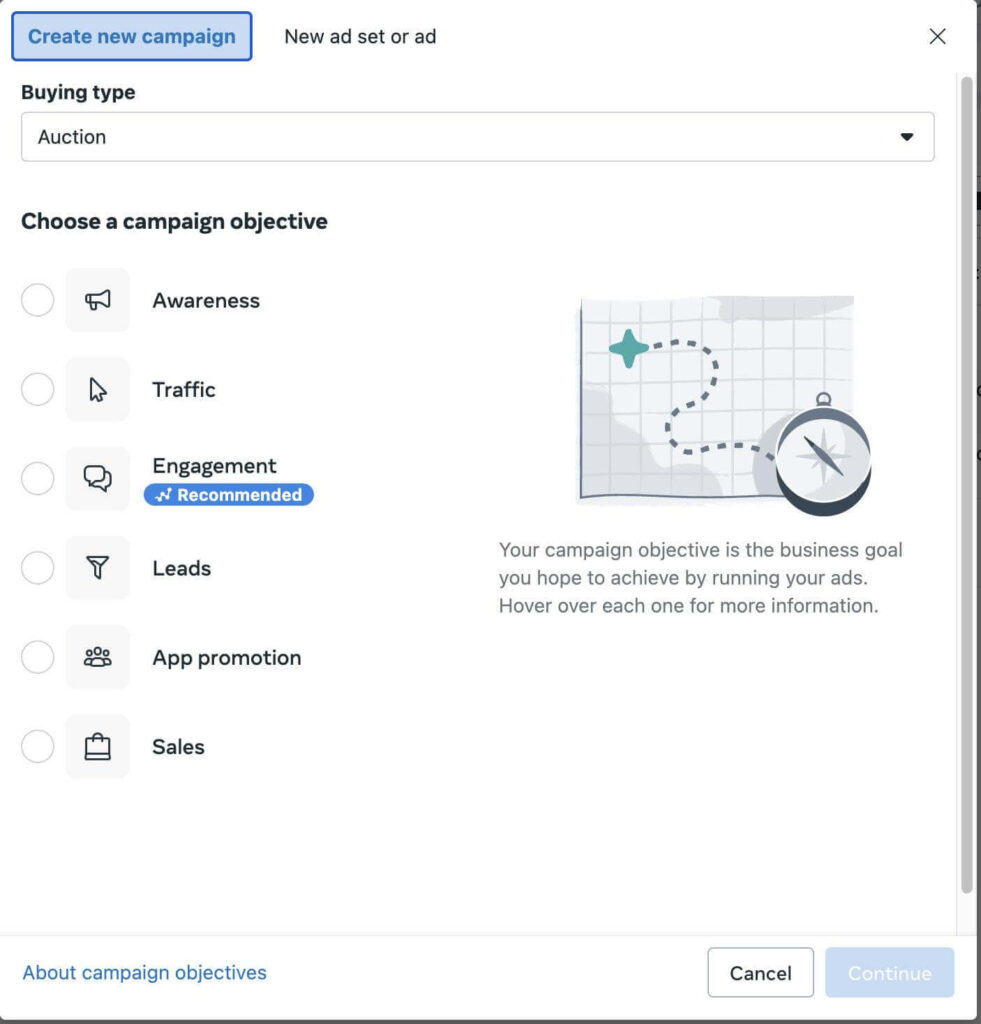
Follow these steps:
- Begin your advertising campaign using the Meta Ads Manager.
- Select the objective which is in sync with your business objective.
- Select your audience according to the location you desire, demographics or interests and anything else which needs to be targeted.
- Determine your budget and the schedule of your campaign.
- Select Instagram Stories with manual placements wherever needed.
- Add your creative and the destination to set up your ad.
The audience will be suitable and not too general or too narrow. A local cleaning business, for instance, does not need to aim at all the people in the nation; it only needs to target those areas it serves.
Good Instagram advertisement campaigns have a set budget. Start by putting in a certain amount that is affordable for you to do some tests and see how well it works out.
3. Build a Vertical Ad That Looks Natural on a Phone
The specifications that are recommended for Instagram Stories ads include a video or photo ad which is suitable for a mobile format, and it is in a vertical format where the ad will fill the entire screen of the phone. The typical Instagram Story ad dimensions are 1080 × 1920 pixels.

Follow these design tips:
- Keep text and logos away from interface areas.
- Use readable fonts and contrasting colours.
- Show the product or main benefit early.
- Focus on one offer or message.
- Avoid cluttered visuals and lengthy text.
For example a cosmetic company could demonstrate the use of their product in creating a glow on the skin or in getting a strong colored lip. With the help of beautiful and clear visuals, you will be able to send out your message.
4. Write the Message and Choose the Right Call to Action
Your visual captures the eye but your message gives people a reason to reply. Lead with a benefit, a common problem or a question your audience will identify.

For instance, a fitness studio might say, “Short on time? Book a 30-minute workout, ” which ties a service directly to a concern.
Keep the message brief and to the point. No unfounded statements and no long-winded message as well. You should also not promise what you cannot deliver.
Select the Instagram Story ad CTA that guides the user through the purchasing process. “Shop Now” works well with a product page, while “Learn More” can be used to bring a user to a page of more detail. Lead-generation campaigns can include an active enquiry action.
5. Review Your Ad Before Sending It Live
A minor mistake in the setup can spend your advertising budget or provide a terrible user experience. Don’t forget to preview your ad on mobile and go through the whole customer journey.
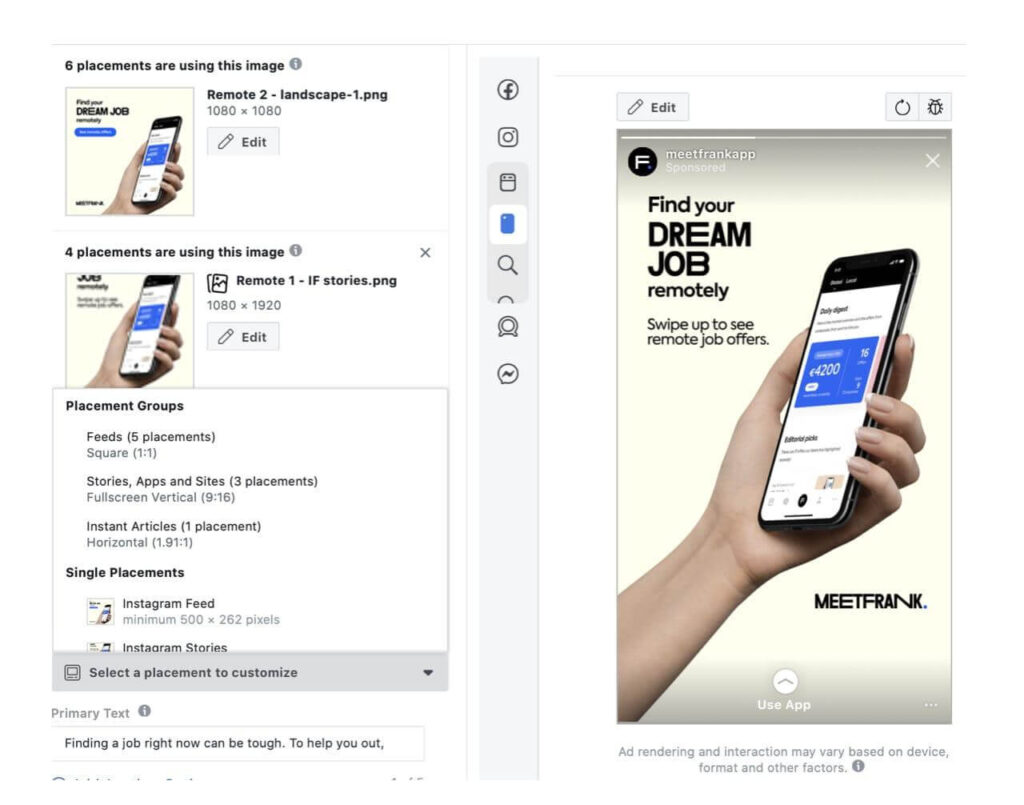
Before publishing, confirm that:
- There is no unnecessary cropping of the picture or video.
- The text, logo, and other critical information are visible.
- The link of the CTA redirects properly.
- The landing page loads perfectly fine on mobile.
- Instagram account, budget, audience, and placements are correct.
Verify spelling, provide extra information, and include any terms or conditions related to a promotion. Where possible, have someone outside the campaign read it through. They might see inconsistency in a message you may have missed.
6. After Publishing: Read the Results
Measure success: Your ad can be published and then you want to track what happens. Look at your monitor reach, impressions, clicks, conversions and cost per result to see if your ad is worth it.
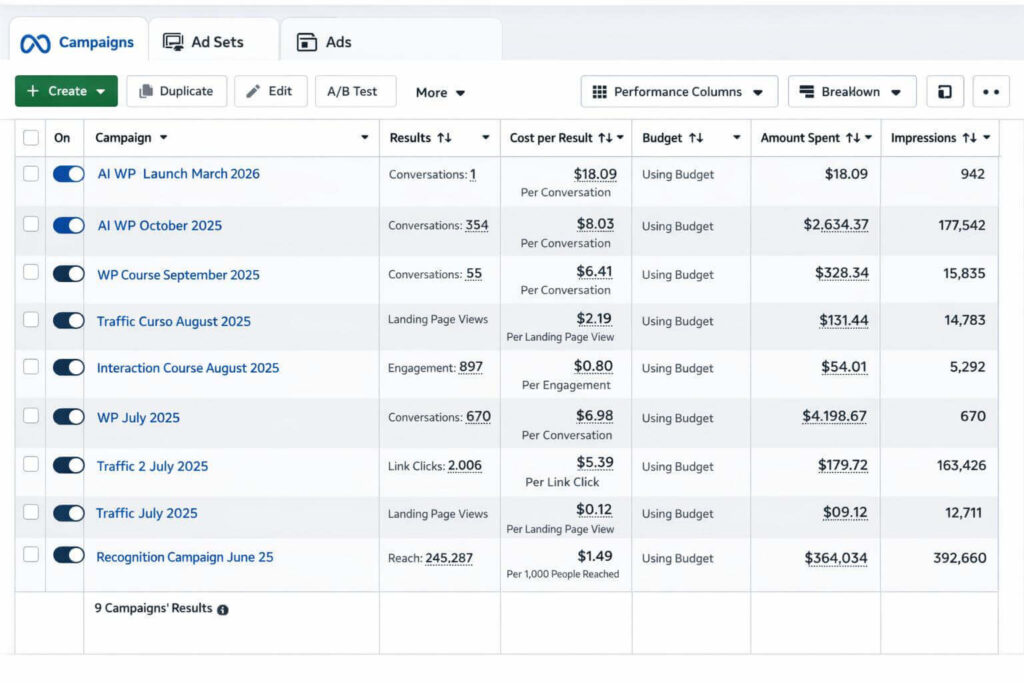
If it is viewed but not clicked, then the visual, offer or call to action needs enhancement. If people are clicking but not converting, take a look at your landing page, price, load speed and checkout.
Test one element, whether it is the headline, the creative or the call to action and track the effect of each piece of content individually. Looking at certain Instagram Story ad examples will definitely help you come up with a new ad idea just ensure you adapt the sample to suit your requirements.
Conclusion
Though there is no specific formula for creating successful stories, one should begin with the planning stage that will include the goals to be achieved, while finishing up with measuring. Make sure that your goal is correctly stated, the target audience is well-defined, remember to optimise for mobile, write effective copy and test it in order to make sure of its success. To get all information about your campaign settings, use the tool provided by Meta Ads Manager and check the results of your work.