
The right size makes all the difference on Instagram. When you nail the dimensions for photos, videos, Stories, Reels, and ads, your content looks sharp, professional, and optimized for every device.
Instagram gives you plenty of ways to show up feed images, carousels, reels, and stories each with unique Instagram post sizes. When your visuals match Instagram’s recommendations, you give your posts the best chance of standing out and getting that all-important social media engagement.
Whatever type of photo or video you’re sharing, here’s how to make sure your Instagram posts always look their best.
Quick guide: Instagram Dimensions 2026
| Format | Recommended Size | Aspect Ratio |
|---|---|---|
| Feed Post (Portrait) | 1080 × 1350 px | 4:5 |
| Feed Post (Square) | 1080 × 1080 px | 1:1 |
| Feed Post (Landscape) | 1080 × 566 px | 1.91:1 |
| Carousel Post | 1080 × 1350 px per slide | 4:5 |
| Instagram Story | 1080 × 1920 px | 9:16 |
| Instagram Reel | 1080 × 1920 px | 9:16 |
| Profile Grid Preview | 1080 × 1440 px | 3:4 |
| Profile Picture | 320 × 320 px | 1:1 (circle) |
Why Instagram Image Size Matters
Using the correct Instagram image size helps your content look clear, professional, and visually appealing across different devices. Proper dimensions prevent blurry images, unwanted cropping, and stretched visuals that can reduce engagement. Instagram automatically adjusts content that does not match recommended sizes, which may affect the overall appearance of your posts, Stories, or Reels. Choosing the right image size also improves user experience, keeps your feed consistent, and increases the chances of getting better reach and interaction.
How Instagram Image Sizes Work: Aspect Ratios vs. Pixels
Before jumping into specific numbers, it helps to understand two terms you’ll see everywhere:
Aspect ratio is the shape of your image its width compared to its height. It’s written as width:height. A 4:5 ratio means the image is 4 units wide and 5 units tall (taller than it is wide). A 1:1 ratio is a perfect square.
Pixels are the individual dots that make up a digital image. More pixels generally means a sharper image. Instagram recommends a minimum width of 1080 pixels for all feed content.
The two work together. The aspect ratio tells you the shape; the pixel dimensions tell you the resolution. You want both to be correct before you upload.
Supported file formats on Instagram:
- Photos: JPG, PNG, BMP, non-animated GIF
- Videos: MP4, MOV
- Maximum file size: 4 GB for videos, 8 MB for photos
Instagram Feed Post Size: What to Use in 2026
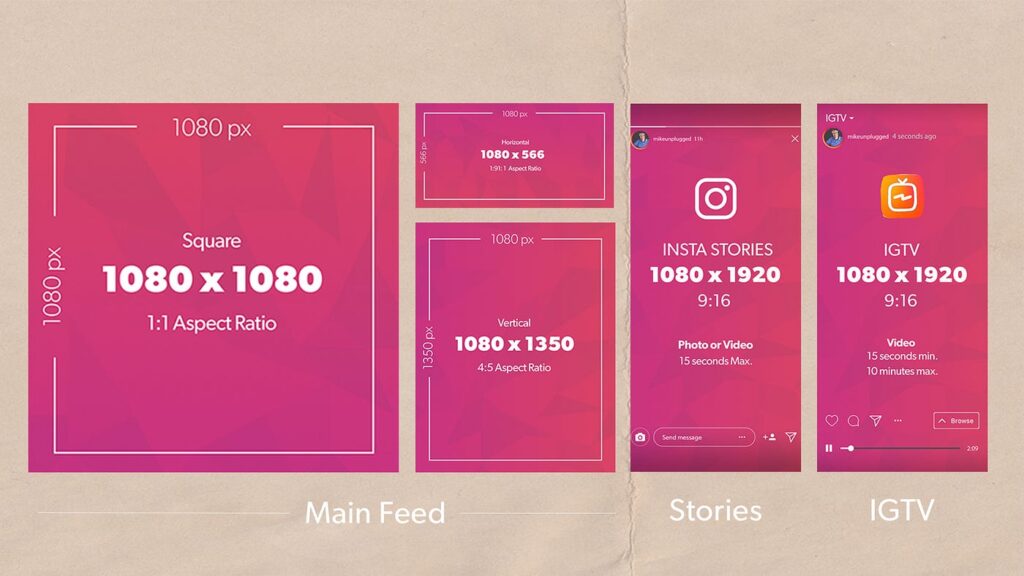
Feed posts are what most people think of when they picture Instagram content. You have three shape options, but they’re not all equal in 2026.
Portrait Posts: 1080 × 1350 px (4:5 ratio) — The Best Choice
This is the recommended default for most feed posts. Portrait orientation takes up more vertical screen space on mobile, which means your content is harder to scroll past before a viewer sees it.
The 4:5 ratio has been around for years, but Instagram now clearly favors it in its feed rendering. If you’re designing content from scratch and you’re not sure which format to use, start here.
Works best for: product shots, portraits, editorial photos, quote graphics, and most branded content.
Pro tip: Keep important text, faces, and logos within the center 1080 × 1080 px zone. That way your post looks intentional both as a full portrait in the feed and as a 1:1 crop anywhere the platform squares it off.
Square Posts: 1080 × 1080 px (1:1 ratio)
Square isn’t the default best anymore, but it’s still useful. It’s a clean, balanced format that works well when your composition is centered and symmetrical.
The era of “square-first Instagram” is over. That said, square posts are a solid choice for quote graphics, infographics, and designs where equal padding on all sides is part of the aesthetic.
Works best for: centered compositions, text-heavy graphics, brand consistency across a themed feed.
Landscape Posts: 1080 × 566 px (1.91:1 ratio)
Landscape is the least recommended format for feed posts in 2026. It takes up the least vertical screen space of the three options, so it gets visually outcompeted by portrait and square posts as someone scrolls.
Use it only when the horizontal framing is essential to the image wide panoramas, product lineup shots, or cinematic stills where cropping to portrait would ruin the composition.
Minimum resolution accepted: 1080 × 566 px. Going below 1080 px wide means Instagram will scale up your image, which softens it.
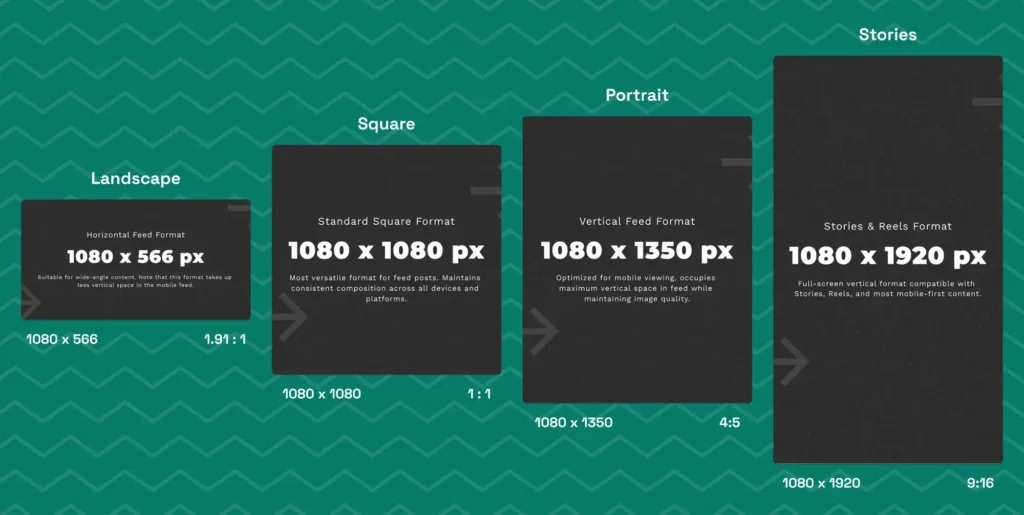
Carousels let you share up to 20 photos or videos in a single swipeable post. They consistently outperform single-image posts in reach, so getting the sizing right here is especially important.
Recommended size: 1080 × 1350 px for every slide (4:5 portrait)
Your content commands more attention as users scroll through their feed. You can also use square carousels at 1080 x 1080 pixels (1:1 ratio) for a cleaner grid appearance.
Landscape carousels work at 1080 x 566 pixels (1.91:1), but they occupy less vertical space and are easier to scroll past.
Key carousel specifications:
- Portrait: 1080 x 1350 px (4:5)
- Square: 1080 x 1080 px (1:1)
- Landscape: 1080 x 566 px (1.91:1)
Instagram Story Dimensions and Safe Zones
Stories are full-screen, vertical, and immersive. They disappear after 24 hours, but that doesn’t mean sizing is less important poorly formatted Stories get skipped faster than any other format.
Recommended Story size: 1080 × 1920 px (9:16 aspect ratio)
The top 14% of your vertical space can be covered by your username, time stamp, and menu buttons. The bottom 21% holds action buttons like commenting, sharing, and the caption area.
Safe zone guidelines:
- Top margin: 250-300 pixels from the edge
- Bottom margin: 400-420 pixels from the edge
- Side margins: 60-80 pixels from each edge
If you’re customizing Instagram Story designs, this guide on Instagram Story templates shares practical ideas for creating visually balanced Stories that fit safely within Instagram’s layout.
Instagram Reel Size: Dimensions for Full-Screen Video
Reels are now Instagram’s primary video format. They get preferential distribution in the algorithm compared to standard feed videos. If you’re creating video content for Instagram, this is the format to prioritize.
Recommended Reel size: 1080 × 1920 px (9:16 aspect ratio)
Your Reels cover image also uses 1080 x 1920 pixels. This cover appears on your profile grid and in feed placements.
The right dimensions are only part of the strategy. Pairing optimized Reels with the right hashtags can improve reach significantly this guide on viral Reels hashtags for 2026 covers what’s currently working.
Video specifications for Reels include a maximum length of 90 seconds and file sizes up to 4GB. The platform supports MP4 and MOV file formats.
Instagram Reel Dimensions Breakdown
| Spec | Value |
|---|---|
| Resolution | 1080 × 1920 px |
| Aspect ratio | 9:16 |
| Frame rate | 23–60 fps |
| Max file size | 4 GB |
| Video length | Up to 3 minutes (extended for some accounts) |
| Profile grid preview | Displays as 3:4 thumbnail |
| Audio | AAC audio, 128 kbps or higher |
Instagram Profile Picture Size
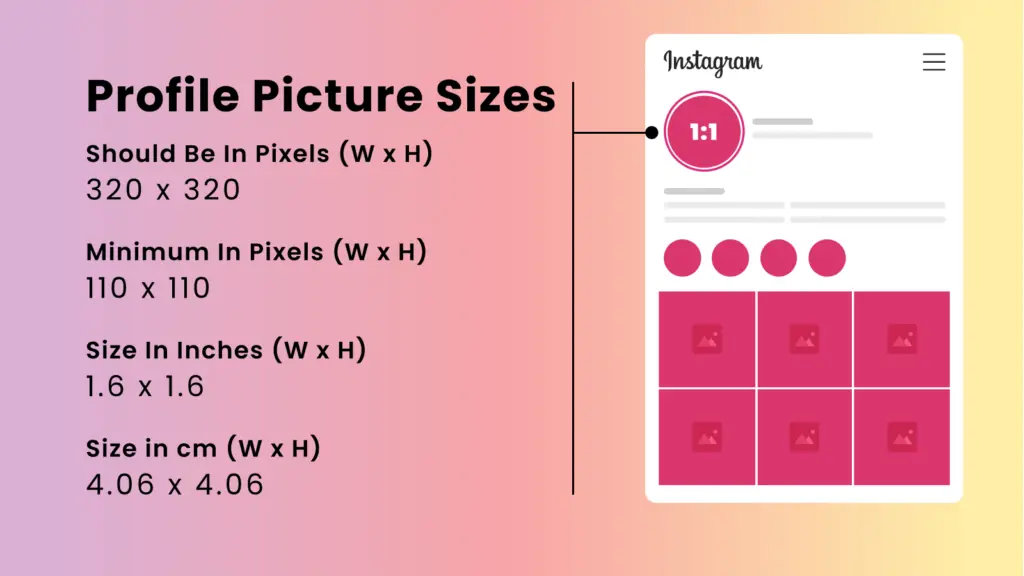
Your profile photo is one of the smallest but most visible images on Instagram. It appears beside every comment, in search results, and at the top of your profile.
Upload size: At least 320 × 320 px (displayed as a circle)
Recommended upload: 1080 × 1080 px or higher for future-proofing
Instagram displays your profile photo as a circle even though you upload a square. This means the corners of your image get cropped automatically.
Use PNG or JPG file formats for best results. PNG files preserve transparency better, but Instagram converts them to JPG anyway.
Instagram Ad Image Specifications
Ad images follow the same dimensions as organic posts. Use 1080 x 1350 pixels for portrait ads, 1080 x 1080 pixels for square ads, or 1080 x 566 pixels for landscape ads.
The Instagram feed ad specifications require images at least 1080 pixels wide. For comprehensive guidance on Facebook ad sizes across all placements, refer to our detailed specifications guide. Lower resolutions appear blurry and reduce engagement.
Video ads support the same aspect ratios as image ads. Keep videos under 60 seconds and maintain at least 1080 pixel width for clarity.
Instagram Story Ad Sizes
Story ads require 1080 x 1920 pixels (9:16 ratio) for full-screen vertical display. This matches the standard Instagram Story dimensions and fills the entire mobile screen.
Your safe zone sits within the central 1080 x 1420 pixels. Keep text, logos, and faces inside this area to avoid the top profile icon and bottom interactive elements covering your content.
Read More: Best Instagram Story Ideas 2026
Story video ads can run up to 15 seconds per segment. Multiple segments create longer story experiences, but shorter content often performs better.
Bonus: Instagram Reels Thumbnail Sizes
Instagram Reels thumbnails play an important role in improving profile appearance and attracting more clicks. A well-designed thumbnail helps your Reel stand out in the feed, Explore page, and profile grid while giving viewers a clear preview of the content.
Recommended Instagram Reels thumbnail size : 1080 × 1920 px (9:16 aspect ratio)
For the best results, creators should use high-quality images, bold text, and clean visuals that remain easy to understand even on smaller mobile screens. Keeping thumbnails visually consistent can also improve overall Instagram branding and make your profile look more professional.
The 2026 Grid Change: What Actually Happened
Instagram officially updated its profile grid in 2025, switching post preview thumbnails from the old 1:1 square format to a taller 3:4 vertical format. This change is now the standard in 2026.
What that means practically:
- Grid previews now display at roughly 1080 × 1440 px (3:4 ratio)
- Old square previews are gone
- Posts up to 1080 × 1440 px are now fully supported as uploads
- Your old square-optimized posts may look differently cropped in grid view
The fix: Design in 4:5 (1080 × 1350 px) and leave extra padding around important elements. This format looks clean in the feed and fits the 3:4 grid preview without awkward cropping.
Once your images are properly optimized, the next step is understanding the best way to publish them across different Instagram formats. This guide on how to post on Instagram photos, Reels, and Stories explains the complete posting process for each content type.
If grid aesthetics are a major priority for your account, you can now upload at 1080 × 1440 px (3:4) to fill the grid preview completely. For most creators though, 4:5 remains the simpler, more versatile standard.
How to Optimize for the New Grid
Follow these strategies to ensure your content looks sharp whether people see the square or taller grid:
Stop creating 1:1 square posts: The era of square-first content is over
Design in 4:5 ratio (1080 x 1350 px): This minimizes cropping in both formats
Leave padding around key elements: Add extra space around borders to prevent cropping in grid previews
Use Instagram’s thumbnail adjustment tool: After posting, tap the three dots and select “Adjust Preview” to reposition your image
Keep critical elements centered: Place text and important visuals within the center square to accommodate users who haven’t received the update yet
Optimizing Image Quality and Aspect Ratios
High-resolution uploads and proper aspect ratios directly impact how Instagram displays your content. Understanding compression helps you maintain visual clarity across all devices.
Image Resolution Guidelines
Always upload images at least 1080 pixels wide for feed posts. If you need to create images at these exact dimensions, use an AI image generator to produce high-quality content tailored to Instagram’s requirements. This width is the minimum resolution Instagram recommends to maintain clarity after compression.
The 4:5 aspect ratio at 1080 x 1350 pixels is your best choice for feed posts in 2026. This vertical format takes up more screen space than square posts, which means your content occupies more of a user’s mobile display.
For Stories and Reels, stick to 1080 x 1920 pixels at a 9:16 aspect ratio. These dimensions fill the entire screen on mobile devices.
Understanding Instagram Compression
Instagram automatically compresses every image you upload to reduce file size and speed up loading times. This compression can reduce your image quality, especially in areas with fine details or gradients.
To minimize quality loss, export your images at 80-90% quality in your editing software. Going higher than 90% often produces files that Instagram will compress more aggressively anyway.
High-contrast images perform better after compression. Photos with clear subjects and distinct color separation maintain their visual impact better than images with subtle tonal variations.
Avoid uploading images smaller than 1080 pixels wide. Instagram will upscale them, which creates blurry, pixelated results that look unprofessional.
Instagram File Formats and Maximum Sizes
Choosing the right file format is important for maintaining image quality on Instagram. Different formats work better for different types of content, such as photographs, graphics, logos, or videos. Using the correct format can help reduce compression issues and improve the overall appearance of your posts.
JPG is best for photographs and images with many colors. This format balances file size and quality well.
PNG works better for graphics, logos, and images with text or solid colors. PNG files preserve sharp edges and transparency better than JPG.
Instagram’s maximum file size is 30 MB for photos and 4 GB for videos. Most phones and editing apps export files well below these limits.
| Format | Best For | Maximum Size |
|---|---|---|
| JPG | Photos and natural images | 30 MB |
| PNG | Graphics, logos, text-based visuals | 30 MB |
| MP4 / MOV | Reels, Stories, video posts | 4 GB |
Maximizing Engagement with the Right Instagram Sizes
Using the correct Instagram post dimensions directly affects how long users view your content and whether they engage with it. The portrait 4:5 ratio outperforms square posts because it takes up 30% more screen space, keeping your content visible longer in the feed.
When you upload images at the wrong size, Instagram crops them automatically. This leads to cut-off faces, missing text, and lower-quality visuals that users scroll past quickly.
Key engagement factors by size:
- Portrait posts (1080 x 1350): Highest engagement, best for vertical subjects
- Square posts (1080 x 1080): Consistent grid look, safe choice
- Stories (1080 x 1920): Full-screen immersion, polls get 2x more engagement
- Reels (1080 x 1920): 67% more engagement than regular posts
Tips: By using the max resolution in your videos you can preserve crystal clarity.