
This invideo AI review comes down to one trade-off. Invideo AI is a strong pick if you edit video every week: the timeline editor is free, and its AI agent takes over the slow parts of editing. The catch is cost. The AI side runs on credits that disappear quickly on video models, and refunds are hard to get once you have used a plan.
If you last tried invideo AI in 2025, the tool you remember has changed. In late July 2026 invideo launched Agent Two, an AI agent that plans, generates and edits video. On September 1 it added a full timeline editor that anyone can use for free. The paid plans are now Basic, Pro and Ultra, priced per seat with a monthly credit allowance.
Below, we cover what invideo AI does well, where your credits go, what the free plan really includes, and who should pay for it. We put this review together from invideo’s pricing page, help docs and release notes, plus what users report on Trustpilot and the app stores. Every price was checked from India on November 7, 2026.
Invideo AI at a Glance
- What it is: A browser-based AI video platform that combines an AI agent (Agent Two), a multitrack timeline editor and more than 200 image, video and audio models.
- Best for: YouTubers, Reels and Shorts creators, marketers and small teams who want AI to handle the first cut.
- Free plan: Yes. The manual editor and every export are free. AI generation needs credits from a paid plan.
- Paid plans: Basic at $9, Pro at $30 and Ultra at $80 per seat per month on monthly billing. Annual billing was 50% off when we checked.
- Export quality: Agent Two exports 1080p MP4 on every plan. Pro and Ultra can upscale the file.
- Works on: Any modern browser on a computer, tablet or phone, plus the invideo app for iOS and Android.
- Official site: invideo.io. Lookalike sites such as invideoai.org state that they are not official.
What Is Invideo AI?
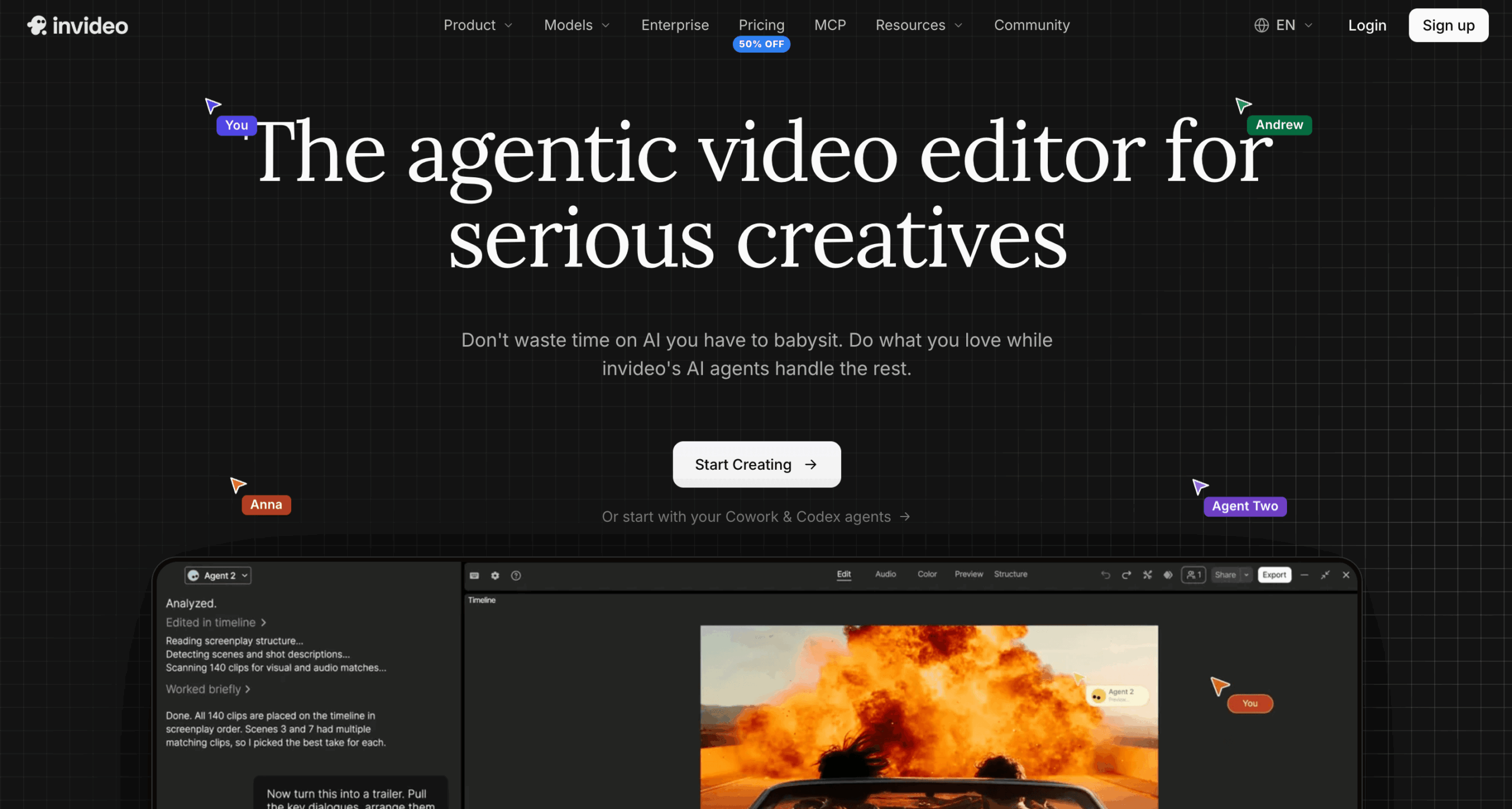
Invideo AI is an AI video creation platform that turns a prompt, a script or your own footage into an edited video. You describe what you want in plain language. Its AI agent then writes, generates shots, pulls stock clips and edits everything on a timeline that you can take over at any frame. Many people still call it the invideo AI video generator, but the 2026 version is closer to a full editing studio with an AI assistant built in.
The company behind it, invideo, was founded in 2017 and started in India. Sanket Shah is its CEO and co-founder. The 2026 product has two main parts: Agent Two, the AI agent that does the creative work, and invideo Editor, the browser editor where that work lands. Agent Two followed Agent One, invideo’s earlier agent, which ranked first overall in Physion Labs’ Physion-Arc 1.0 benchmark for minute-long, multi-scene videos in July 2026.
Two older products are still around. The first is invideo Studio, the template editor with more than 5,000 ready-made templates. The second is the previous invideo AI flow, where AI twins and voice cloning sit. You open it from Older versions on the home screen.
Key Features of Invideo AI
Agent Two Plans, Generates and Edits for You
Agent Two is the center of the 2026 product and the way invideo now handles text to video. Tell it what you want to make and it turns the request into a plan, generates the shots, adds sound and music, and assembles a cut you can review. It runs in three modes: Lite for quick, low-credit drafts, Pro for finished work, and Ultra for the highest-quality models and settings. It also remembers each project, so you do not have to describe a character again every time it appears.
A Free Timeline Editor Built for Real Editing
Launched on September 1, 2026, invideo Editor is a multitrack editor that runs in your browser, with nothing to install. You get keyframes with custom easing curves, a motion graphics library, an audio mixer that keeps voice, music and sound effects on their own tracks, and color tools with wheels, curves and LUT support. Version control lets you try an alternate cut on a branch and go back to any earlier state. The manual editor costs nothing, and invideo does not cap how many projects you create or how much footage you upload.
Edit Your Own Footage by Describing It
Footage editing is where invideo AI goes further than most prompt-only video generators. Upload raw clips and the assistant editor builds a base cut: it picks the best takes, removes filler words and long pauses, and flags script lines you never recorded. Shot an interview on two cameras? It lines up the angles and cuts to whoever is talking. You can also find a moment by describing a person, an emotion or an action, and ask it to copy the pacing of a reference video you like.
200+ AI Models and Licensed Stock in One Place
You can use more than 200 video, image and audio models inside a single project, including Seedance 2.5, Google Veo 3.1, Kling, Nano Banana Pro, Ideogram, Flux Kontext and ElevenLabs voices. According to invideo, each model is charged at its original API price. On a paid plan you also get stock footage, photos and music from Storyblocks, Shutterstock, Pexels and Pixabay, and a set number of premium iStock clips each month.
You can use the videos you make for commercial work under invideo’s terms. Stock clips stay under their own licenses, and you should not generate a real person’s likeness or another brand’s logo without permission. The licensing and commercial use page spells out the rules.
AI Twins, Voice Cloning and Dubbing
You can create an AI twin, a lifelike digital copy of you that reads your script with your face and voice, which saves a camera setup every time you record. You can also clone your own voice for voiceovers. Invideo’s docs show how to translate and dub a finished video into other languages in the same voice, with the lips re-synced. Only clone a voice you have the right to use, such as your own.
Connect ChatGPT, Claude or Gemini Through invideo MCP
Since September 30, 2026, invideo MCP lets you plug the AI assistant you already work with, such as Claude, ChatGPT, Codex, Gemini or Cursor, into invideo Editor. The assistant then edits on your timeline while you watch. Those edits are free, and you only pay credits for generation, transcripts and paid stock.
Team Editing and Exports to Premiere Pro
Several people can work in the same project at once with live cursors. Reviewers can pin comments to an exact frame, and the assistant editor can make the change a comment asks for. When the cut is ready, export an MP4, an audio file or a still image. You can also export a project file and keep editing it in Premiere Pro, Final Cut Pro or DaVinci Resolve, with the cuts and layers preserved.
Pros and Cons of Invideo AI
Pros
- The manual editor and every export are free, with no cap on projects or footage.
- One plan covers the agent, 200+ models, stock and the editor, so you are not paying for five separate tools.
- Every AI edit lands on a real timeline, so you can fix one scene by hand instead of regenerating the whole video.
- You can see the credits each Agent Two reply used, and connected agents state the price before they spend.
- Projects export to Premiere Pro, Final Cut Pro and DaVinci Resolve if you want to finish elsewhere.
- Invideo is SOC 2 Type II certified and GDPR compliant, which matters for client and company work.
Cons
- Credits go fast on video. Basic’s 190 monthly credits cover about 7 short Seedance 2 Fast clips, and on Pro a 5-second Seedance 2.5 clip at 1080p costs about 96 credits.
- Unused credits expire every month, and credits are non-refundable.
- Refunds only apply to plans you have not used, so paying, testing and then asking for your money back will not work.
- Basic only includes Agent Two Lite and a limited set of models, so most people will end up on Pro.
- Indian users are charged in US dollars, and UPI is not among the listed payment options.
- Reviews are mixed. Invideo AI holds 2.9 out of 5 on Trustpilot from 912 reviews. Users praise the support team but often say credits ran out before they got the video they wanted, especially on longer projects.
How to Use Invideo AI
Follow these steps to get a usable first video without wasting credits.
- Sign up on the official site. Go to invideo.io and create an account, or log in if you already have one. Avoid lookalike sites and apps that borrow the invideo name.
- Start with a script, an idea or your own clips. Paste a script, describe the video, or upload footage. If you are starting from a blank page, write the script first with our YouTube Script Generator and paste it in.
- Pick the right Agent Two mode. Use Lite while you test ideas, then switch to Pro or Ultra for the final version. Lite costs fewer credits but cannot upscale the export.
- Check the cost as you go. After each Agent Two reply, open the three-dot menu on that message to see the credits it used. Project Usage shows the running total for the project.
- Give feedback in plain words, then fine-tune by hand. Ask for changes such as “cut the pauses,” “shorten the hook” or “add B-roll of a busy street.” For precise control, trim, caption and color the clips yourself on the timeline, which costs nothing.
- Export and publish. Download an MP4, or an editable project for Premiere Pro, Final Cut Pro or DaVinci Resolve. Before you post it as a Reel or Short, write the caption with our Instagram Caption Generator.
Who Should Use Invideo AI?
- YouTubers and faceless channels that want to turn a script into a finished video with stock footage, generated B-roll and an AI voiceover.
- Reels and Shorts creators who cut one long video into several vertical versions, which is the quickest form of content repurposing.
- Small businesses and D2C brands that need product ads and UGC-style ads without hiring a video team.
- Social media managers and agencies that edit with teammates and clients in the same project.
- Filmmakers and microdrama creators who need the same characters to look consistent across hundreds of shots.
Who should skip it: If you only need quick, free edits on your phone, or you want one-click videos on a tight budget, the credit system will frustrate you. Invideo AI works best for people who have time to review drafts and the budget to run a few of them again. If that is not you, our roundup of AI video tools for social media content covers other options.
What Makes Invideo AI Unique?
Most AI video tools do one job. Kling, Veo and Seedance generate clips. HeyGen is built around AI avatars and presenter videos. CapCut is a template-heavy editor. Invideo puts an AI agent, the generation models and a professional timeline in the same browser tab. A generated clip, a stock shot and your own footage can sit on one timeline and be edited together.
The second difference is control. Many generators hand you a finished file, and if one scene is wrong you regenerate the whole thing. In invideo, every AI change is an ordinary edit on the timeline, so you fix that scene and keep the rest.
Choosing between invideo AI and HeyGen comes down to the job. If your main need is a talking presenter or an avatar video, HeyGen is more focused. If you edit your own footage or make ads that mix B-roll, stock and voiceover, invideo covers more of the work.
Invideo AI Pricing and Plans in 2026
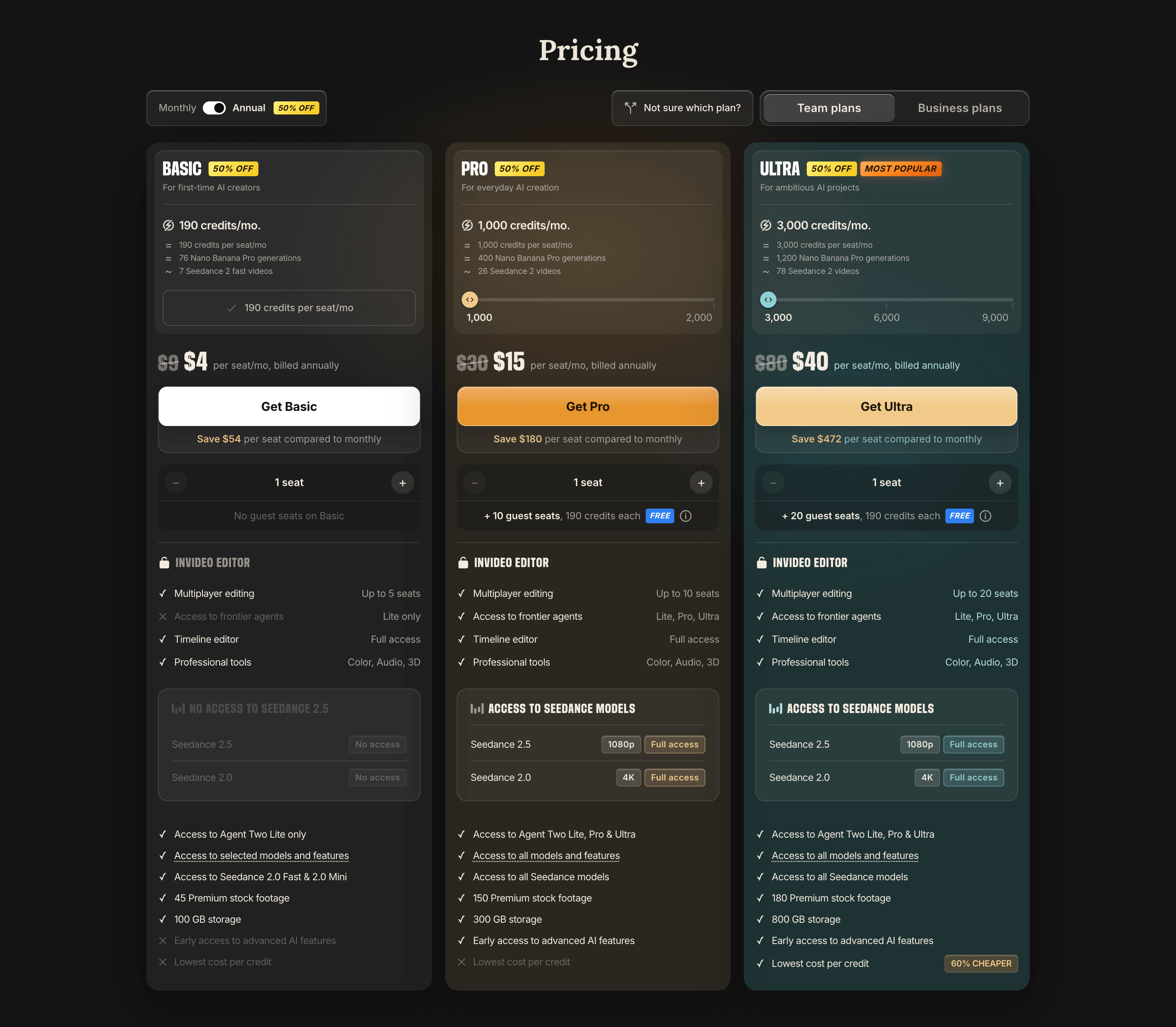
Invideo AI runs on credits. Every paid plan includes the full editor. What changes is how many credits you get each month, which Agent Two modes and models you can use, and how many people can share the workspace. These are the prices invideo’s pricing page showed from India on November 7, 2026, per seat per month on monthly billing. Annual billing was 50% off at the time.
- Free: The manual timeline editor and exports. The pricing page lists no monthly AI credits for free accounts, so Agent Two and generation need a paid plan.
- Basic, $9 a month: 190 credits, Agent Two Lite only, a limited set of models such as Seedance 2.0 Fast and Mini, 45 premium stock clips, 100 GB of storage and up to 5 seats.
- Pro, $30 a month: 1,000 credits (a 2,000-credit option is available), all Agent Two modes, all models including Seedance 2.5 at 1080p and Seedance 2.0 in 4K, 150 premium stock clips, 300 GB of storage, up to 10 seats and 10 free guest seats with 190 credits each.
- Ultra, $80 a month: 3,000 credits (6,000 and 9,000-credit options are available), everything in Pro, 180 premium stock clips, 800 GB of storage, up to 20 seats, 20 free guest seats, early access to new features and the lowest cost per credit.
- Enterprise: Custom plans through invideo’s sales team.
How Far Do Invideo Credits Go?
Credit costs depend on the model, the clip length and the resolution. Invideo’s own estimates give a useful feel:
- One Nano Banana Pro image costs about 2.5 credits, so Basic covers roughly 76 images a month.
- A 5-second Seedance 2.5 clip costs about 24.5 credits as a draft, 56 at 720p and 96 at 1080p.
- Pro’s 1,000 credits cover about 26 Seedance 2 videos, and Ultra’s 3,000 cover about 78.
- Editing, exporting and downloading cost nothing.
Your credits refill each month on the day you first subscribed, including on annual plans, and anything you have not used is gone at the reset. If you run out, you can buy extra credits without changing your plan. Those top-up credits have their own expiry date and also lapse if your plan ends.
Paying for Invideo AI From India
The website charges Indian users in US dollars, so the amount on your statement depends on the exchange rate and any foreign currency markup your bank adds. The pricing page lists cards, Apple Pay and Google Pay as payment options. If you subscribe inside the iOS or Android app instead, Apple or Google set the price and may add local taxes, so it can differ from the website price.
Cancellation and Refunds
You can cancel at any time from Subscriptions in your profile menu, and the plan stays active until the end of the period you paid for. A refund is only considered if you ask within the refund window in invideo’s terms and have not used the plan. Invideo counts a plan as used once any credits are spent or a premium feature is touched in that billing period. Credits are non-refundable, and App Store purchases are refunded through Apple. Read the refund rules before you choose an annual plan.
Is Invideo AI Worth It? Our Verdict
Yes, for the right person. If you edit video every week and want an assistant that handles the slow parts, invideo AI covers more of the job than most AI video tools you can open in a browser. The free editor alone includes keyframes, audio mixing and color grading. Pay for Pro, not Basic, if you want the Agent Two modes and video models that make the AI side worth the money.
It is a poor fit if you want cheap one-click videos, because the credit costs above add up quickly. Our advice: start free, learn the editor, then pay for one month of Pro on monthly billing before you commit to a year.
Sociolyzer rating: 4 out of 5