
Snapchat views are generally considered as the aggregate total of the views that have been registered on a specific piece of content while Snapchat viewers are generally considered as the aggregate total of the viewers of the particular content. It may be possible that the number of views may be greater than the number of viewers as an individual may view multiple snaps.
Understanding Snapchat Insights Beyond the Numbers
Insights Snapchat The Insights enables you to have access to information regarding the way your audience found your content and how they interacted with it. You won’t only be looking at your views but your reach, views and engagement and reach metrics.
For example, a Story that gets many views but less number of unique viewers may lead to rewatching. Similarly one Story may reach out to many people but get fewer repeated views. All this information is useful for you.
Understanding Snapchat Insights metrics will assist you in making decisions concerning the topics and videos you will upload on Snapchat.
Snapchat Views vs Viewers – What Each Metric Actually Means
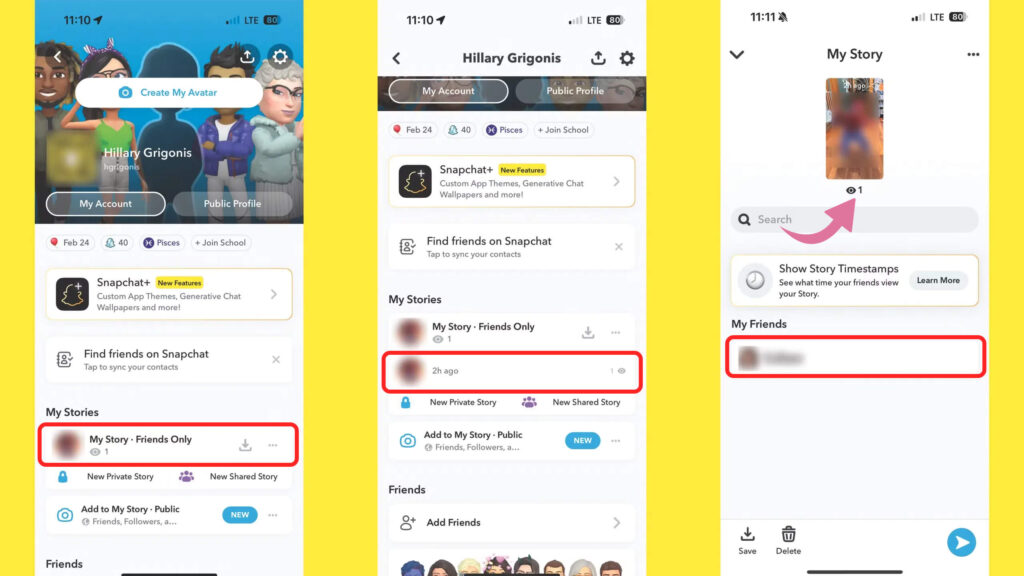
Views and viewers measure different aspects of content performance.
- Views: The view count generated by the content according to the metric definition for Snapchat.
- Viewers: The total number of distinct people who watched your video during the time period covered by this metric.
Why Can Views and Viewers Show Different Numbers
One user can view more than one Snap in a Story and in doing so, increase the Snap view count but not the viewer count. Nevertheless, how it is counted depends on what content format and metric is being viewed in Insights.
A Simple Example
If 100 different people see your Story and out of those people see multiple Snaps in it, your Snap views will be 180 and the unique viewer count will be 100.
It doesn’t imply that 180 different people saw your story; it simply means that your Snap views were greater than the number of unique viewers.
How Views and Viewers Differ Between Snapchat Stories and Spotlight
The data for Snapchat Stories and Spotlight may not be comparable since the two utilise different forms of content.
Public Stories: Total Snap Views vs Unique Viewers
Multiple Snaps can form a Public Story. The total number of Snap views could refer to the number of views of the individual Snaps, whereas the number of unique viewers is the number of people who viewed the content when that measure is provided.
For instance, an individual can view four Snaps in your Story. This contributes to the total count, but the individual is still counted as one single viewer.
It is important to look at both the number of views as well as how many people have viewed your Snap Story when analysing the Snapchat Story views.
Spotlight: Video Starts vs Unique Viewers
Spotlight allows you to share your eligible videos with users who are not following you. You will be able to get insights related to the views, watch time, and more.
It is possible that one video view is not equal to one unique viewer. It is therefore important to understand how the metric works through the analysis of the names on the Insights tab.
Snapchat Spotlight analytics will assist you in knowing if your videos are popular or not.
Why You Should Not Compare Story and Spotlight Metrics Directly
Stories and Spotlight have two separate functions. Stories usually connect you with an existing audience, whereas Spotlight introduces your content to a new audience.
The viewership metrics for these two tools may also be defined differently. Compare Stories to other Stories and Spotlight videos to other videos instead of assuming that their metrics mean the same things.
How to Find Views and Viewers in Snapchat Insights
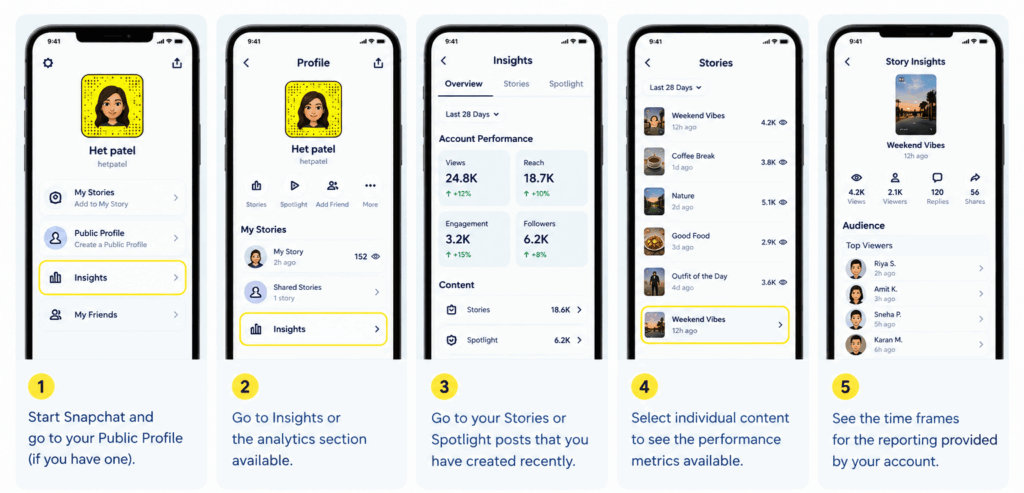
Follow these steps to review your content performance:
- Start Snapchat and go to your Public Profile if you have one.
- Go to Insights or the analytics section available.
- Go to your Stories or Spotlight posts that you have created recently.
- Select individual content to see the performance metrics available.
- See the time frames for the reporting provided by your account, including recent weeks or months, and any longer periods available.
The specific interface and metrics will vary depending on the account type, Snapchat application version and content type. When a specific metric is not available, refer to the data provided by Snapchat for the post.
Other Snapchat Insights Metrics Worth Understanding
They are valuable; however there are other factors that can determine the success or failure of a particular post.
Average View Time and Total View Time
The average view time is the amount of time people spend watching on average, whereas the total view time is the sum of time they have spent watching.
In case a video has lots of views but low average viewing time, there is something wrong with the start of the video.
Average View Rate on Spotlight
When possible, average view rate may be used to understand how much of a video is viewed on average. Similar videos may be compared in order to determine whether shorter introductions or good storytelling increase retention.
Story Replies, Shares, Screenshots and Favorites
This helps in knowing whether the content promotes engagement with the readers, or they feel motivated to interact with it by sharing or saving it. The availability of the content is different from each content piece.
For users who want additional Story-related features, Snapchat Plus offers options such as Story Rewatch Indicator, which provides more insight into Story rewatch activity.
Followers Gained From Individual Spotlight Posts
If Snapchat offers you follower boosts for a certain post, then use this data to find out what type of content prompts users to follow your account. This might be particularly helpful when you try various topics or videos.
How to Interpret Views and Viewers Using Realistic Examples
When there are multiple views but only a few unique viewers, this could mean that there are more than one Snap that is being watched by a single person. Alternatively, when there are multiple unique viewers but not much watch time, this could imply that the content is drawing the interest of the audience but is failing to keep them hooked; hence working on your introduction is recommended. On the other hand, fewer views with many shares and replies could mean that your content has fewer people who appreciate it.
How to Use Snapchat Insights to Improve Content Performance
Snapchat also uses interaction activity to rank close friends in its Snapchat Solar System, a feature that helps users understand their friendship rankings. If the watch time is poor, introduce your topic early and cut any introduction that might not be necessary. Posts with the same type of content should be compared over an equal span of time
One should try experimenting with something single at a time like video length, opening statements or storytelling style to see how it influences the result. One must keep an eye on the analytics on a regular basis and not only on post by post basis. The main purpose is to know how people reach you through your videos.
Conclusion
Snapchat views and viewers are two distinct ways to measure content success. Views represent the number of recordings, while unique viewers provide an estimate of the number of people who viewed your content, provided this metric exists.
Reviewing the Story and Spotlight analytics separately can assist you in comprehending the metrics, and thus finding areas where you might improve your content. You can add viewing metrics to other data like watch time, shares, replies, and followers.