If you have ever managed multiple links across platforms, you know how quickly things get chaotic. One day you promote a blog post, the next a product page, and soon you are juggling several links with no clear way to organize them.
Research shows the global affiliate marketing market was already worth around $17 to $18.5 billion by late 2025, with projections to cross $20 billion in 2026. Yet most platforms still give you just one clickable link, which makes the problem even worse.
This is exactly the gap tools like Linkrify aim to solve. Instead of forcing you to pick one link, it lets you create a single page that holds everything in one place. This Linkrify review explores how the platform supports SEO‑driven workflows, affiliate tracking, and multi‑campaign management in detail. So, let’s get started!
What is Linkrify?
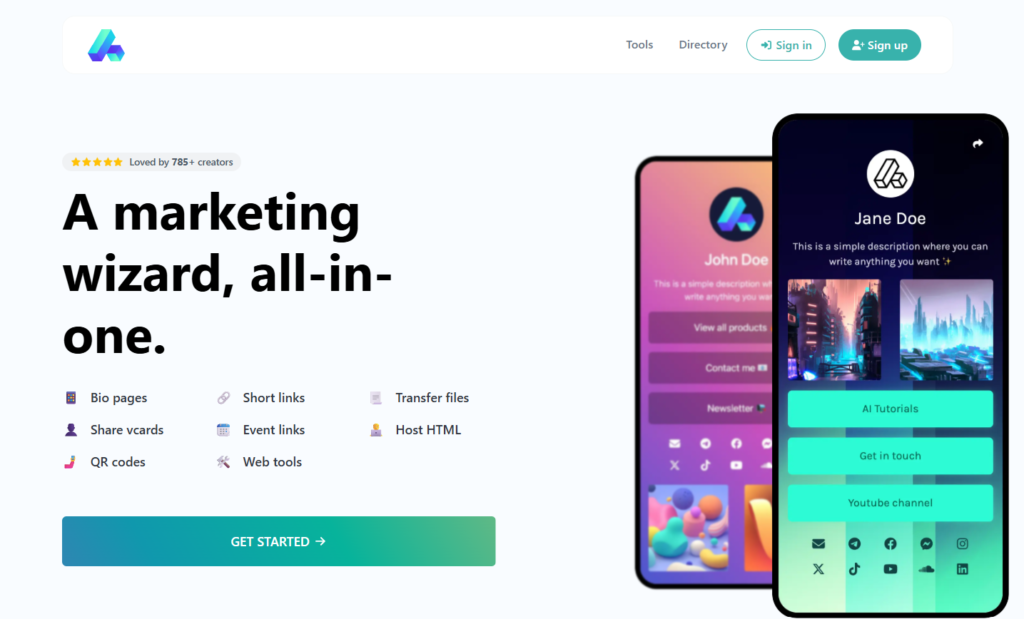
Linkrify is a simple link management tool that helps you keep many links in one place. Instead of sharing different URLs every time, you can create one page and add all your important links there. Then, you just share that one link with your audience. It makes things easier for both you and the people who visit your page.
You can think of it like a small menu. Instead of giving only one option, you give multiple choices, for example, someone can click your blog, watch your video, or check your product from the same page.
Key Features of Linkrify
The unique Linkrify features are designed to keep things simple but still useful. It does not try to be too complicated, which is actually a good thing. Instead, it focuses on making everyday link management easier and faster. Some of the most prominent features include:
Easy setup and quick start
One of the best things about the Linkrify tool is how simple it is to use. It is not necessary to have technical knowledge or design skills. You can create your account, add your links, and go live in just a few minutes.
This is helpful for beginners who are afraid of complex instruments. You could focus on your business or content instead of spending time learning how the platform works.
Flexible link organization
You can arrange your connections in any desired sequence using Linkrify. This may seem straightforward, but it makes a big difference. Placement is crucial because the majority of people click on the first few links they encounter.
For instance, you may put a link at the top if you’re having a sale. You can swap it out for another link once the offer is over. This keeps your page lively and pertinent to the content you’re advertising.
Built-in link shortener
The embedded link shortener is another useful feature. Instead of using an external tool, the Linkrify tool allows you to create short, clean links. This allows sharing and keeps everything in one place. Furthermore, short links appear more refined. Consumers are more likely to click on a clean link in emails or text messages.
Analytics and performance tracking
Analytics and performance tracking are two of Linkrify’s features that let you know how well your links are working. The most clicked links, the source of your visitors, and the frequency of each link’s opening are all readily visible to you. For creators already using social media analytics tool this data fits right into your existing reporting workflow.
This information becomes quite helpful over time as with this, an affiliate marketer can determine which product connections are more effective and concentrate more on them. A blogger can promote comparable posts by observing which content receives the greatest attention and for video creators, using this data alongside tactics to boost YouTube impressions can amplify results further.
QR code support
QR code support is one of the Linkrify tool’s most useful features. It enables you to easily connect your offline and online presences. You can place your QR code on posters, product packaging, and business cards.
A small business owner, for example, could display it on their store counter so that customers can immediately access their Linkrify website. People can then view products, special deals, and contact information all in one place.
Explore More: Trending social media quotes for captions, posts, and reels
How Linkrify Works
Using the Linkrify tool is quite simple, but the way you use it over time makes a big difference. You can follow the steps below:
Step 1: Create your page
Start by setting up your Linkrify page and adding all the links you want to share. This becomes your single, central link.
Step 2: Use it everywhere
Add this one link to your Instagram bio, email signature, and marketing campaigns. Instead of updating multiple links, you only update your Linkrify page.
Step 3: Share consistently
Keep using the same Linkrify link across all platforms so your audience always lands in one place.
Step 4: Track performance
Monitor how people interact with your links. See which ones get clicks and which ones don’t.
Step 5: Optimize your page
Rearrange and prioritize links based on performance. For example, move your most important or recent content to the top to drive more engagement.
Linkrify Pricing & Plans
The Linkrify pricing is pretty simple. The free plan includes all the basic features you need to get started like you can add multiple links, use simple design options, and access basic analytics to track performance. This makes it a good choice for users who are just testing the platform.
The Pro plan costs around $8 per month and unlocks more Linkrify features where you get better customization, advanced analytics, and the option to use your own domain. The Business plan is priced at about $25 per month and is designed for teams or agencies. It offers team access, better control, and additional features for managing multiple users.
Pros and Cons
Looking at Linkrify pros and cons helps you understand the tool in a balanced way. Every tool has strengths and weaknesses, and Linkrify is no different.
Pros
- Easy to use, even for beginners
- Free plan offers real value
- Helps organize links clearly
- Analytics provide useful insights
- Works for different use cases
Cons
- Limited customization in the free version
- Branding remains unless you upgrade
- No mobile app for management
- Advanced features may take time to understand
Who Should Use Linkrify?
Linkrify can make it much easier to share several links at once.
It is especially handy for folks who seek a simple way to arrange links while also understanding what is causing clicks. Instead of constantly changing one bio link, you have a single location to manage everything effectively.
Bloggers and content creators
Bloggers and creators usually have content spread across blogs, YouTube, newsletters, and social platforms from written posts to the latest
Instagram Reels trends. A 2026 content‑creator report shows that full‑time creators manage an average of four platforms, yet most of the creators rely on a single link in bio to drive traffic back to their key content pillars.
With Linkrify, you can bring your multiple resources onto a single landing page to make it easier for your audience to explore your work. If you also follow solid Content Repurposing Strategies this becomes even more powerful since your audience finds everything in one spot.
Affiliate marketers
Affiliate marketers usually promote multiple products at once. This is exactly where Linkrify comes to the rescue. It organizes these links and tracks which ones perform better. Over time, they can focus on high-performing products. They can also improve their earnings without adding more work.
Small business owners
Linkrify can serve as a simple landing page for small enterprises. They can display their offerings, services, and contact information in one location rather than creating a whole website. This is especially useful for local businesses that need a quick online presence.
Agencies and marketers
Agencies managing multiple campaigns can opt for Linkrify in order to track traffic and link performance. It helps them analyze which campaigns are working and where improvements are needed. This further helps to scale up reporting and optimization extensively.
Linkrify Alternatives
There are several Linkrify alternatives available and it’s helpful to understand how they compare before making a decision. Some of these include:
Linktree
Linktree is one of the most popular tools in this space as it is easy to use and widely recognized. However, its free version has limited analytics. This can be a drawback if you want deeper insights.
Beacons
Beacons offer more features focused on creators. These primarily include selling products and collecting emails and although it is powerful, it can feel slightly complex for users who only need basic link management.
Bitly
Bitly is mainly known for link shortening and tracking and works well for campaigns, but does not provide a full link-in-bio page. It is better suited for users who need tracking rather than organization.
Here’s a comparison table for a quick glance:
| Feature/Tool | Linkrify | Linktree | Beacons | Bitly |
| Core Use Case | Bio link page + link tracking | Bio link page for social profiles | Creator-focused bio link + monetization | URL shortening + link tracking |
| Customization | Basic themes on the free plan, more options on the paid plan | Limited templates on the free plan, more on the paid plan | Offers layout and design customization | Minimal (not a page builder) |
| Analytics | Click tracking, referral sources, device data (limited on free plan) | Clicks and views on the free plan, deeper insights on the paid plan | Click tracking and audience insights | Detailed link analytics and campaign tracking |
| Link Shortening | Yes (built-in short links) | No native shortener | Limited (not a core feature) | Yes (core feature) |
| QR Code Support | Yes | Limited or paid feature | Not a core feature | Yes |
| Custom Domain | Available on paid plan | Available on paid plan | Available on paid plan | Available on paid plan |
| Referral Tracking | Yes (available on free plan) | Not available on the free plan | Available | Available |
| E-commerce Support | Can add product/payment links | Supports integrations like Shopify | Supports selling digital products and links | Not built for e-commerce |
| Ease of Use | Simple setup, beginner-friendly | Very easy to use | Slightly more features to manage | Very easy for link shortening |
| Best For | Marketers, freelancers, creators who want tracking + bio page | Beginners and influencers | Creators who want monetization tools | Businesses focused on tracking links |
| Pricing | Free plan + paid (~$8–$15/month range) | Free + paid from ~$5/month | Free + paid plans available | Free + paid plans available |
Is Linkrify Worth It? (Final Verdict)
After going through this Linkrify Review, it is clear that the tool solves a simple but important problem. It makes link management easier and helps you organize your content in a better way.
For beginners, bloggers, and small businesses, the free plan is already useful. It allows you to manage links without spending money and improves how your audience interacts with your content.
For advanced users, the paid plan adds more control and insights. It may not replace advanced tools, but it works well as a central hub for managing links.
So, is Linkrify legit and worth using?
Yes, especially if you want a simple and effective way to manage multiple links without making things complicated.