Instagram Shadowban is one of the most frustrating issues creators and brands face, with many reporting engagement drops of up to 50 to 90 percent overnight. One day your posts reach thousands and the next they barely get seen, even by your followers. While Instagram denies the term “shadowban”, the impact is very real.
If your content is not appearing in hashtags or on the Explore page. it may also be because you are not using the right hashtags. how to choose high-performing Instagram hashtags can make a big difference. you could be affected. In this guide, you will learn what an Instagram shadowban means, why it happens, and how to get unshadowbanned on Instagram to restore your reach and engagement.
What is an Instagram shadowban? (Reality vs Myth)
Instagram shadowban has been a topic of debate for many years, and there are a lot of myths and misconceptions around it. Let’s understand what it really means and what happens behind the scenes.
An Instagram shadowban is commonly used to describe a situation where your content suddenly loses visibility without any warning. Your posts may stop appearing in hashtag searches or on the Explore page, which means fewer people discover your content beyond your existing followers. As a result, your reach and engagement can drop sharply even though your account is still active.
What does Instagram say about shadowban?
Here is where the confusion begins. Instagram has repeatedly stated that “shadowban” is not an official feature. In 2018, the platform clarified to journalists that it does not hide content arbitrarily. Later, in 2019, Adam Mosseri explained that not every post appears under hashtags because Instagram prioritizes content users are more likely to find relevant and engaging.
Does the Instagram shadowban actually exist?
Yes, it does. But not in the way most people think. Instagram does not “ban” accounts silently. Instead, it uses algorithms to control how widely your content is distributed. Content that is considered low quality, spammy, or borderline may still remain on your profile, but its reach is reduced. This creates the exact experience users describe as being shadowbanned.
How Instagram actually limits your reach?
This behavior is part of a broader system often described as “remove, reduce, inform.” Content that clearly violates guidelines is removed, while content that falls into a gray area is simply shown to fewer people.
- Remove: Content that breaks rules is taken down
- Reduce: Content with lower trust signals gets limited reach
- Inform: Users may see warnings or context
The most important part for shadowban is “reduce.” This is where Instagram limits how often your posts appear in hashtags, Explore, and recommendations.
What is borderline content on Instagram?
A key reason for reduced reach is something known as borderline content. These are posts that do not directly violate Instagram’s rules but may include misleading information, repetitive engagement tactics, or behavior that appears unnatural to the algorithm. Because of this, such content is less likely to be recommended to new audiences, which directly impacts your visibility and growth.
Simple explanation (what it really means)
In simple terms, what users call an Instagram shadowban is actually algorithmic reach suppression. Your content is not removed, but it is no longer pushed to non-followers. The platform may deny the term “shadowban,” but the effects that people describe are very real.
Instagram shadowban – Key highlights
- Instagram shadowban refers to reduced content visibility, where your posts are not shown to non-followers in hashtags or Explore.
- It is not an official term, but Instagram does reduce distribution of content it considers low quality or borderline.
- Mia Khalifa has publicly claimed Instagram confirmed shadowban-like behavior exists behind the scenes. (YouTube)
- You can get unshadowbanned on Instagram by removing problematic hashtags, stopping automation, and following platform guidelines.
- Most Instagram shadowbans are temporary, and accounts usually recover within a few days to two weeks after corrective actions.
What are the signs you are shadowbanned on Instagram?
If your Instagram performance suddenly drops, it could be a sign that your content visibility is being limited. Here are the most common signs to look for:
- Sudden drop in engagement: Likes and comments fall significantly without a clear reason.
- Low non-follower reach: Insights show less than 10% reach from non-followers.
- Hashtag invisibility: Your posts do not appear under hashtags you used.
- No Explore page reach: Content stops getting discovered by new audiences.
- Fewer impressions: Sharp decline in reach from hashtags and Explore.
- Stalled growth: Followers stop increasing despite consistent posting.
Quick fact:
Sudden engagement drop is one of the biggest signs of shadowban, with likes and comments often decreasing by 2 to 4 times compared to normal performance.
How to check if you are shadowbanned on Instagram in 2026?
You cannot confirm an Instagram shadowban with a single official tool, but you can test for it using a few simple checks. Use the following methods to check if your reach is being limited:
Method 1: Check your account status (official method)
Go to Settings > Account > Account Status to see if Instagram has flagged your content. This section shows whether your posts are eligible to be recommended to non-followers.
Method 2: Hashtag visibility test
- Post with relevant hashtags: Publish a new post using a few hashtags that are relevant to your content and not overly broad or spammy.
- Ask non-followers to search for it: Ask a few people who do not follow your account to search those hashtags and look for your post under recent results.
- Check whether your post appears: If your post does not show up for them, but it is visible to you, your content reach may be restricted.
Pro tip: Use a different device and account for this test. Instagram may still show your own content to you, even if others cannot see it easily.
Additional signs your reach is being limited
- Check Instagram Insights: Compare current reach with your usual performance.
- Monitor hashtag impressions: If they drop close to zero, your posts may not be ranking.
- Test with new hashtags: Better performance can indicate issues with previous tags.
- Search your profile externally: Ask others to check visibility in search.
- Analyze engagement trends: Look for consistent decline across multiple posts.
- Check for action limits: Temporary restrictions may indicate flagged activity.
If multiple signals appear at the same time, there is a strong chance your account is being affected.
Why you get shadowbanned on Instagram?
Instagram does not randomly limit accounts. Its algorithm constantly evaluates content quality and trust signals to decide how widely your posts should be distributed. If your activity looks spammy or against platform guidelines, Instagram may reduce your reach instead of removing your content completely. This is what most users experience as an Instagram shadowban. Here are the most common reasons why it happens:
- Using banned or restricted hashtags: Some hashtags are flagged or hidden by Instagram due to misuse or inappropriate content. Using these hashtags, even unknowingly, can lead to Instagram shadowban.
- Spammy or bot-like activity: Actions like following, liking, commenting, or sending DMs too quickly can make your account look automated. Instagram may restrict your reach to prevent spam.
- Using automation tools or bots: Third-party tools that promise followers, likes, or engagement often violate Instagram’s policies. These tools can trigger algorithmic restrictions on your account.
- Repeating the same hashtags: Using the same set of hashtags in every post can signal low-quality or repetitive behavior, which may reduce your content distribution.
- Posting low-quality or “borderline” content: Content that does not break rules but feels misleading, repetitive, or low value may not be promoted to new audiences.
- Violating Instagram guidelines: Even minor violations of Community Guidelines, such as inappropriate content or copyright issues, can cause Instagram shadowban.
- Getting reported by users: If multiple users report your content, Instagram may limit your visibility as a precaution.
- Unnatural engagement patterns: Sudden spikes in activity, such as mass liking or commenting, can signal suspicious behavior and reduce your account’s trust level.
How to fix Instagram shadowban (Step-by-Step)
If you are wondering how to get unshadowbanned on Instagram, follow this step-by-step approach and tips:
1. Stop all risky activity immediately (reset phase)
Start by pausing anything that may trigger the algorithm. This includes aggressive actions like mass liking, commenting, or following in a short time. If you are using bots or automation tools, stop right away. Instagram’s system is designed to detect unnatural behavior patterns, and continued use can extend the restriction period.
2. Clean up your account (recovery phase)
Next, remove anything that could be limiting your reach:
- Delete or edit posts that include restricted or irrelevant hashtags
- Avoid using the same hashtag sets repeatedly
- Remove access to suspicious third-party apps or tools
Even one problematic hashtag can affect the visibility of your entire post, so it’s important to review them carefully.
3. Take a short break (cooldown phase)
Many users notice improvement after stepping away from Instagram for a few days. Reducing activity for 2 to 7 days can help reset your account’s behavior patterns and signal normal usage to the algorithm.
4. Rebuild trust with the algorithm (growth phase)
This is the most important step and where most people go wrong. Instead of trying to “hack” the system, focus on sending strong positive signals:
- Post high-quality, relevant content that people engage with
- Encourage saves, shares, and meaningful comments
- Use a mix of targeted and niche hashtags
- Keep your activity natural and consistent
The goal is to show Instagram that your content is valuable and worth recommending again.
5. Gradually resume normal activity
Once your reach starts improving, avoid jumping back into old habits. Increase your activity slowly and maintain a natural pattern to prevent getting flagged again.
6. Contact Instagram support (if needed)
If your reach does not recover after taking these steps, you can report the issue through the app. Focus on explaining that your content is not reaching your audience rather than mentioning an Instagram shadowban.
Pro tips to recover faster from an Instagram shadowban
Here are some other tips you can follow to recover quickly from Instagram shadowban:
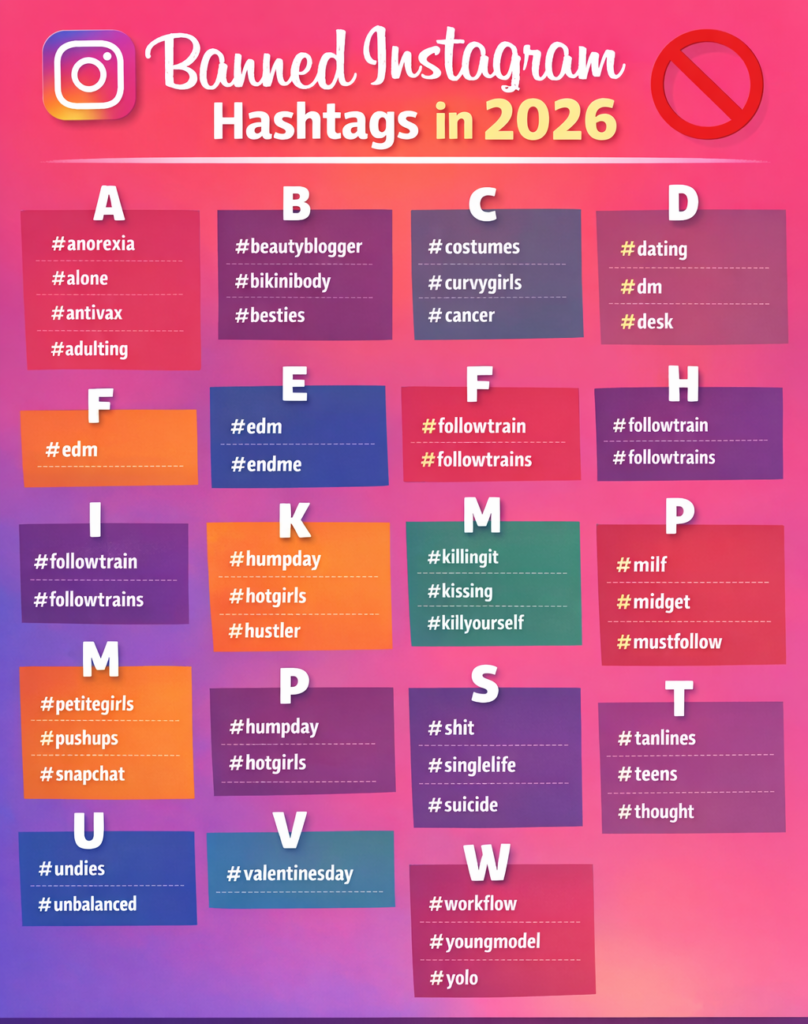
- Avoid repetitive hashtags: Using the same hashtag set repeatedly can signal low-quality or spammy behavior. Rotate and customize hashtags for each post.
- Place hashtags in captions: Add hashtags in the caption instead of comments so you can edit and remove problematic ones if needed.
- Slow down your posting frequency: If you do not want to take a full break, reduce how often you post and avoid sudden spikes in activity.
- Stay away from engagement pods: Even manual engagement groups can look unnatural to the algorithm and reduce your reach.
Wrapping up
An Instagram shadowban can slow down your growth and engagement, but it is usually temporary and fixable. By understanding the causes, checking the signs, and following the right recovery steps, you can fix your reach quickly. Focus on quality content and consistent posting. Leveraging AI-powered social media tools and strategies can also help improve your reach over time. and follow Instagram’s guidelines to rebuild trust and grow your account safely over time.