
Losing a long Snapchat streak can be frustrating especially when you’ve been sending Snaps for weeks, months, or even years. That little flame next to your friend’s name is more than just an emoji it represents consistency, friendship, and effort. Luckily, in many cases, you can restore a lost Snapstreak if it recently disappeared or if it ended due to technical issues.
In most cases, you can get it back. Snapchat actually has a few ways to restore your streak, and some of them are completely free. In this guide, I’ll walk you through everything you need to know step by step.
What exactly is a Snapchat streak?
A Snapchat streak, or Snapstreak, begins when you trade snaps, not chats, with a friend for three days in a row. Once the third exchange lands, a small fire emoji lights up next to that friend’s name and a numbered counter shows how many days you have kept it going.
To keep that streak alive you must send a snap within twenty-four hours and your friend must reply before the same period ends. It seems straightforward, yet misses even one deadline and SNAP-click-the streak disappears.
Method 1: Use the In-App “Restore Streak” Button (Fastest Option)
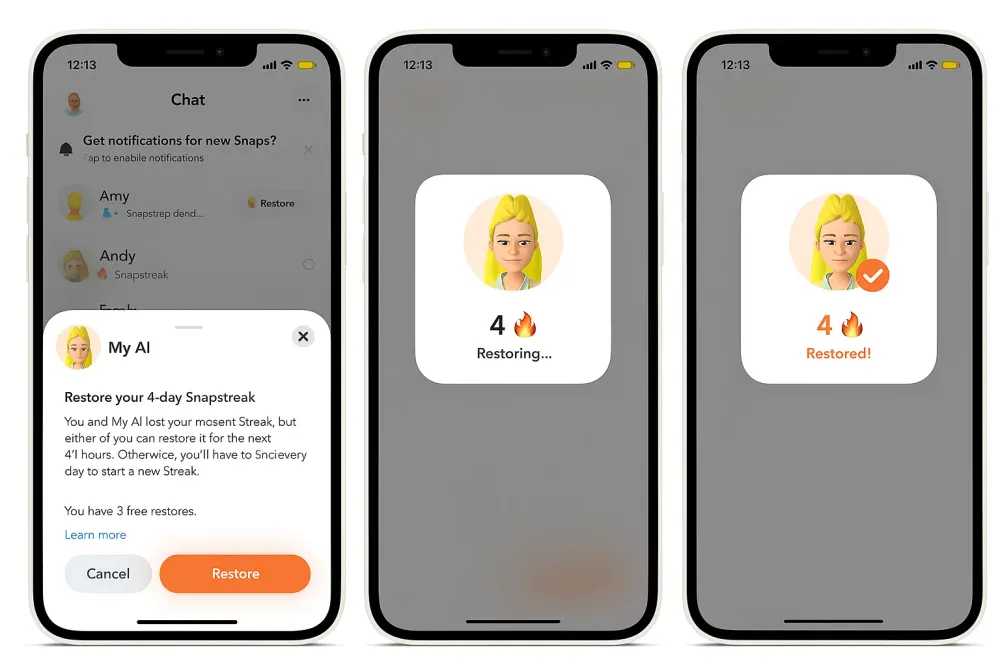
When your streak ends recently, Snapchat sometimes gives you a direct “Restore” button inside the app. This is the fastest & most straightforward way.
Step-by-Step Instructions
- Open the Snapchat app and go to the Chat with the friend whose streak ended.
- If the streak ended recently (within a short window), the top of the chat may show a “Restore Streak” banner or button.
- Tap “Restore”. Follow any prompts (Snapchat may ask for confirmation).
- After submission, wait for the notification that the streak has been restored.
- Resume sending daily snaps to keep the streak going.
Pros
- It’s free (no payment required) since it’s built into Snapchat.
- Fastest method no waiting for external support.
- Official route (safe, supported by Snapchat).
Limitations
- Only works if the streak ended very recently. If the end is too far in the past, no “Restore” button will show.
- Even when it appears, you have to act quickly delay may mean the option disappears.
- After using it, you still need to keep the streak active; restoring doesn’t give you immunity from losing it again.
Short summary: If you just lost the streak and the “Restore” banner is visible, this is your best bet. Consistency is key on every platform staying updated with the latest Instagram Reels trends can also help you build daily engagement habits.
If you’re managing multiple social media accounts and want to maintain consistent posting schedules, tools like social media management tool can help automate and organize your content strategy.
Method 2: Contact Snapchat Support (Free & Official)
If the in-app button didn’t show up (or you missed it), your next best option is reaching out to Snapchat’s support team directly. This method takes a little more effort, but it works especially if your streak ended due to a genuine technical problem.
Step-by-Step Instructions
- Open your browser and go to help.snapchat.com
- Navigate to “My Account & Security” → “Snapstreaks”
- Look for the article titled “I lost my Snapstreak” and tap the support form link
- Fill in your Snapchat username, registered email address, your friend’s username, the approximate streak length, and a brief description of what happened.
- Submit the form and wait
Pros
- It’s completely free and officially supported by Snapchat.
- A good option if the in-app “Restore” button doesn’t show up.
Limitations
- There’s no guarantee your streak will be restored.
- If too much time has passed, Snapchat may refuse the request.
- Response time can vary it may take a few hours.
Short summary: Use this when the in-app restore option is gone, but the streak end is still fairly recent and you have a legitimate reason.
Method 3: Use Snapchat+ for Monthly Free Restores
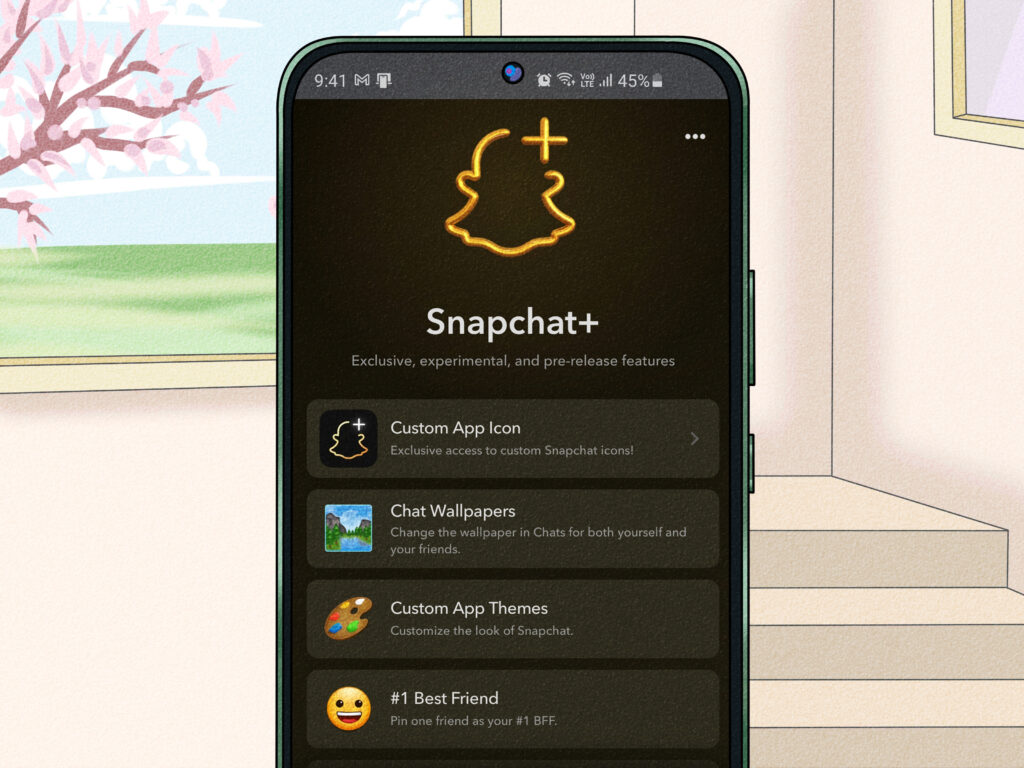
Snapchat+ is Snapchat’s paid subscription that offers extra features including limited streak restore options.
Step-by-Step Instructions
- Open the Snapchat app.
- Tap your Profile (Bitmoji) in the top left corner.
- Select Snapchat+ and subscribe if you’re not already a member.
- Once subscribed, go to the chat where your streak ended.
- If eligible, tap the “Restore” button to use your available restore credit.
- Confirm the restore and wait for the streak to reappear.
Pros
- Offers a built-in restore option directly inside the app.
- Faster than contacting support.
- May include monthly restore credits (depending on Snapchat+ benefits).
Limitations
- Requires a paid Snapchat+ subscription.
- Restore credits may be limited per month.
- Not all expired streaks qualify for restoration.
Short summary : Snapchat+ allows subscribers to restore eligible lost streaks directly in the app using limited monthly restore credits. It’s faster than contacting support, but it requires a paid subscription.
Avoid Third-Party Snapchat Streak Restore Tools
When you search online for ways to restore a Snapstreak, you might see websites or apps claiming they can “instantly recover” your lost streak. Be careful most of these AI tools are not safe. Snapchat does not allow third-party apps to restore streaks.
The only official ways are:
- The in-app “Restore” button
- The official Snapchat Support form
- Snapchat+ restore credits
Anything outside of these is unofficial and risky.
Why You Should Avoid Them
- They may ask for your Snapchat login details.
- They can steal your account or personal data.
- Your account could get locked or permanently banned.
If a website promises “unlimited free streak restore” or asks you to download unknown software, that’s a red flag.
Short summary: If it’s not inside the Snapchat app or on help.snapchat.com, don’t trust it.
How Many Times Can You Restore a Snapchat Streak for Free?
This is one of the most common questions people have, and the answer depends on what plan you’re on:
- Free Snapchat users — You can use the in-app restore button when it appears, or submit a support form. There’s no guaranteed monthly allowance, and Snapchat decides case by case.
- Snapchat+ subscribers — You get one free in-app streak restore every month. Additional restores beyond that require an extra in-app purchase.
Tips to Prevent Losing Your Streak Again
Restoring is only part of the story keeping the streak alive matters. Here are some practical tips:
- Set a daily reminder or calendar alert at roughly the same time each day.
- If you have poor internet or app issues, check your delivery status: the hourglass emoji means the streak is about to expire.
- You don’t need a perfect photo send a quick snap (even a blank or simple one) instead of skipping entirely.
- Consider enabling notifications for Snapchat to alert you if you missed sending.
- Keep your Snap partner informed: if you’ll be travelling or offline, send a snap ahead of time
If you manage multiple social platforms, tools like Zoho Social can help schedule posts and reminders so you stay consistent across your accounts.
Final Thoughts
Losing a Snapchat streak can feel worse than it sounds especially when you’ve built it day by day for months or even years. That small icon represents consistency and connection, so it’s completely normal to want it back.
The good news is that Snapchat does give you options. If you act quickly, the in-app Restore button is the fastest solution. If that’s gone, contacting Snapchat Support is still a free and official way to request help. And if you’re a Snapchat+ subscriber, you may have access to monthly restore credits.
The most important thing is timing. The sooner you try to restore the streak, the better your chances. After that, focus on building a simple daily habit so you don’t have to worry about losing it again.